
For Australian venue operators and event organisers, the best ticketing platforms to shortlist are EventBookings (integration-first venues needing a broad AU feature set), TryBooking and Humanitix (community, charity and low-cost events), and Ticket Tailor (frequent small events where predictable pricing matters most). No single platform is the cheapest for every event — the right choice depends on your ticket price, volume, add-ons required and payout timing needs.
- Fees first: All-in cost modelling — platform fee plus payment processing plus add-ons — determines real cost, not the headline percentage.
- Integrations matter: A 2025 industry survey found 42% of venues still run disconnected systems, creating avoidable admin and revenue leakage.
- Payout timing is a cash-flow issue: Some platforms hold funds until after the event; others release at sale. For venues paying suppliers upfront, that gap is a real cost.
Pricing snapshot: AU market, 2026. Re-check platform fee pages before committing.
Key takeaways
The most reliable way to choose booking software is to model the all-in cost for your specific event before comparing headline fees.
| Point | Details |
|---|---|
| Model all-in cost first | Add platform fee, payment processing, add-ons and payout timing before comparing platforms. |
| 42% of venues use disconnected systems | Integrations with Stripe, Xero and Google Calendar recover admin time and reduce revenue leakage. |
| Payout timing affects cash flow | Confirm whether funds release at sale or post-event — critical when paying suppliers upfront. |
| Trial with a real paid event | A live low-price ticket tests the full payment and payout flow better than any sandbox. |
| Adelaideweddingvenues for venue discovery | Adelaide and South Australia venue owners can capture enquiries via a searchable directory listing with no ticketing workflow required. |
How do these booking platforms compare on fees, features and AU fit?
The table below covers the five platforms on the dimensions that matter most to Australian organisers. Prose profiles follow.
| Platform | Platform fee | Payment processing | Hidden/add-on costs | Free plan | Best for | Integrations | Payout timing | Day-of tools | AU support |
|---|---|---|---|---|---|---|---|---|---|
| EventBookings | Varies by plan; percentage + per-ticket | Bundled processor options (AU) | Reserved seating, white-label, advanced reporting may be add-ons | Limited free tier available | All event sizes: corporate, festivals, workshops, community | Stripe, calendar sync, CRM options | Varies by plan | Scanning, check-in tools | AU-based |
| Eventbrite | Free for free events; percentage + per-ticket for paid | ~2.9% + AU processing fee (Stripe-style) | Reserved seating, white-label, marketing tools | Yes — free events only | Large events, marketplace discovery | Stripe, Mailchimp, Google Calendar, Salesforce | Typically post-event or scheduled | Scanning app, check-in | Global support |
| Ticket Tailor | Per-ticket fee (tiered by volume) | Bring your own processor (Stripe/PayPal) | Minimal; seat maps cost extra | Yes — pay-as-you-go | Frequent small-to-mid events | Stripe, PayPal, Zapier, Mailchimp | At sale (via your own processor) | Basic check-in app | Email/chat |
| TryBooking | Low flat per-ticket fee (AU cents range) | AU card processing included | Minimal add-ons; seat maps available | Yes | Community, schools, theatres, sporting clubs | AU payment gateways, basic integrations | Scheduled AU payouts | Scanning, door list | AU-based |
| Humanitix | Percentage + per-ticket; NFP discounts available | Stripe-style processing | White-label, advanced features may cost extra | Yes — limited | Charities, NFPs, social-impact events | Stripe, Xero, Mailchimp | Scheduled payouts | Check-in app | AU-based |
EventBookings gives Australian organisers a single platform covering corporate conferences, festivals, workshops and community events. Its bundled processor options reduce the friction of connecting a third-party gateway, and its feature set scales from small ticketed events to high-volume day-of operations with scanning and check-in tools. Reserved seating and white-label options may sit behind paid tiers, so model those costs before committing.
Eventbrite brings genuine marketplace reach: your event appears in Eventbrite’s discovery feed alongside millions of others, which can meaningfully lift attendance for large public events. The trade-off is a percentage-plus-per-ticket fee structure that adds up quickly at scale, and global support rather than AU-based assistance. Integrations with Stripe, Mailchimp and Google Calendar are well-documented.
Ticket Tailor suits organisers running frequent smaller events who want predictable, transparent pricing. You bring your own Stripe or PayPal account, which means funds settle directly to you at sale — a genuine cash-flow advantage. The platform is lean on discovery features, so it works best when you already have your own audience.
TryBooking is the natural home for community groups, schools, local theatres and sporting clubs. Its per-ticket fees sit in the low AU-cents range, local payment handling is built in, and AU-based support is available. The integration depth is narrower than EventBookings or Eventbrite, but for straightforward community ticketing it rarely matters.
Humanitix directs platform profits to charity and offers discounted rates for eligible not-for-profits, making it the standout choice for NFPs and social-impact events. Xero and Mailchimp integrations are available. Organisers outside the NFP category pay standard rates, so the charitable model is the primary differentiator rather than raw cost.
How we compared these platforms: methodology and a worked example
The goal was to measure all-in cost and operational fit for Australian venues, not just headline fees. Comparing platforms honestly requires modelling the full cost stack: platform fee, payment processing, add-ons and payout timing.
Assumptions used:
- AU pricing snapshot, 2026 (sourced from each platform’s published fee pages).
- Sample event: 200 tickets at $75 each (total face value $15,000).
- Fees passed to buyer where the platform allows it; organiser-absorbs model also calculated.
- Payment processing modelled at a Stripe-style rate of 2.9% + $0.30 per transaction.
- Add-ons modelled: reserved seating (where applicable) and basic check-in scanning.
- Payout timing noted as at-sale, scheduled, or post-event.
Worked example (organiser-absorbs model, 200 × $75 tickets):
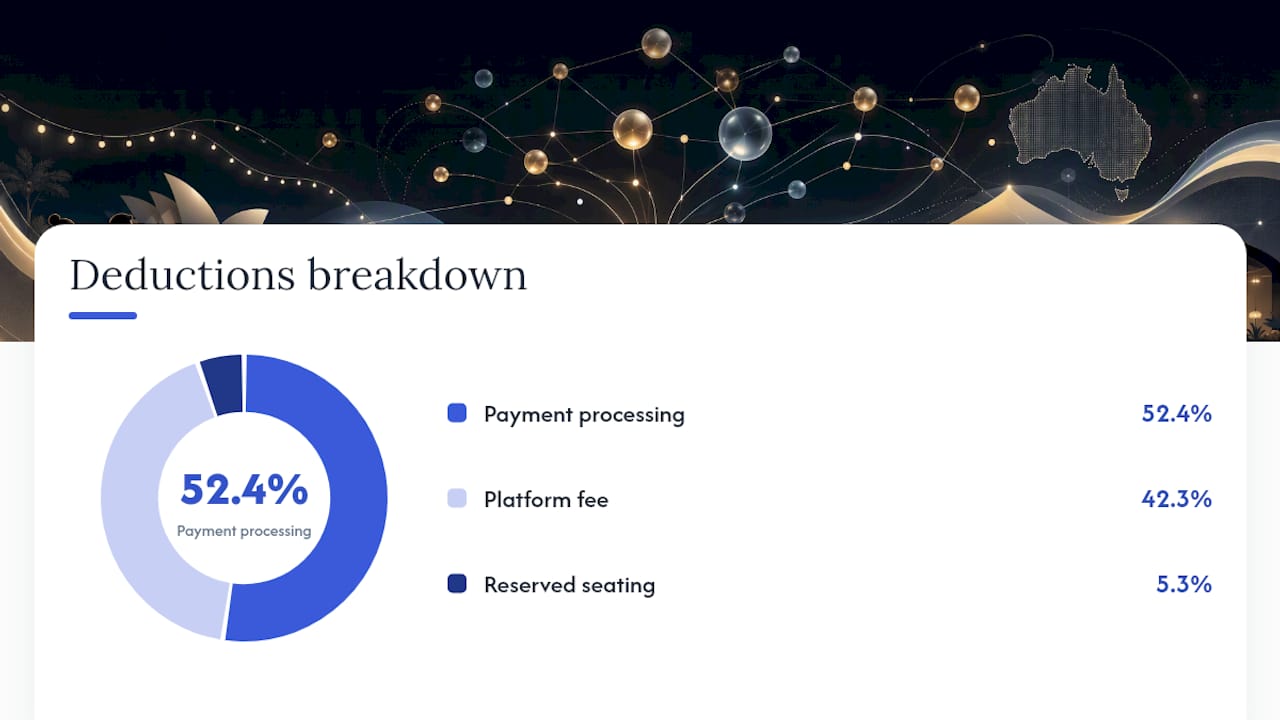
- Gross revenue: $15,000.
- Platform fee (illustrative 2% + $0.50/ticket): $300 + $100 = $400.
- Payment processing (2.9% + $0.30 × 200): $435 + $60 = $495.
- Reserved seating add-on (illustrative $50/event): $50.
- Total deductions: $945.
- Net proceeds to organiser: $14,055.
Statistic to note: 42% of venues still use disconnected systems — meaning the $945 in platform costs above is only part of the real cost picture when manual reconciliation time is factored in.
Actual fees vary by platform and plan. Re-check each platform’s current AU fee page before running your own model, and repeat the exercise whenever you change ticket price or volume.
Can you trial these platforms before committing?
All five platforms offer some form of free access before you pay. Eventbrite and TryBooking let you publish free events at no cost, which is a practical way to test the checkout flow and organiser dashboard without spending anything. Ticket Tailor’s pay-as-you-go model means there is no subscription to cancel; you simply stop using it. EventBookings and Humanitix both offer free tiers or trial access, though feature limits apply.
The most useful trial approach is to run a small paid event — even a $5 test ticket — so you can verify the full payment flow, check payout timing in practice, and confirm that your Stripe or Xero connection works end-to-end. A sandbox test alone will not reveal how long a real payout takes.
Pro Tip: Before signing up for a paid plan, publish one live event at a low ticket price and track the time from sale to funds in your account. That single test tells you more about payout behaviour than any documentation.
What are the contract terms and cancellation policies?
None of the five platforms lock organisers into long-term contracts in the traditional sense. Eventbrite, Ticket Tailor, TryBooking and Humanitix operate on a per-event or month-to-month basis; you can stop using them at any time. EventBookings plan terms vary, so review the specific tier before upgrading.
The more important policy to check is the refund and chargeback handling process. Platforms differ on who bears the cost of a chargeback: some deduct it from the organiser’s next payout, others have a dispute process. Under Australian Consumer Law, refund obligations sit with the event organiser, not the platform, so your own refund policy needs to be clearly stated at checkout regardless of which platform you use.
Data portability is also worth confirming before you commit. Check that you can export your full attendee list, transaction history and contact data at any time — this matters for compliance with the Australian Privacy Principles (APPs) and for migrating to a new platform later.
What is the mobile app experience like for organisers and attendees?
Eventbrite has the most mature mobile experience of the five, with a dedicated organiser app for check-in scanning and a well-known attendee app that stores tickets. TryBooking and EventBookings both offer scanning tools accessible via mobile browser or app for door management. Ticket Tailor’s check-in app is functional and free to use. Humanitix provides a check-in app suited to smaller events.
For attendees, the experience is largely determined by the checkout flow on mobile web rather than a dedicated app. Ticket Tailor’s checkout is notably clean on mobile, which reduces abandoned purchases. Eventbrite’s attendee app adds discovery value for public events.
The integration dividend is larger than most organisers expect
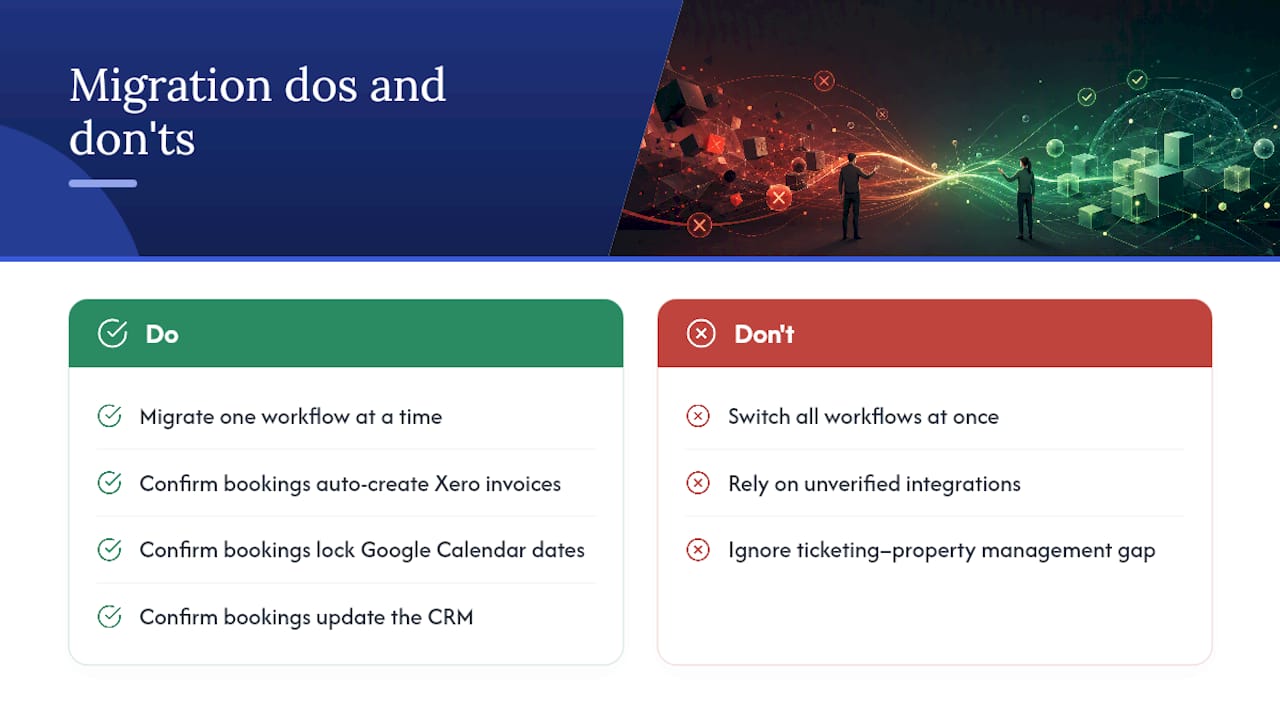
Migrate one workflow at a time — that is the single most important rule when moving to a new booking platform. Trying to switch ticketing, accounting, CRM and calendar sync simultaneously is the most common reason venue teams abandon a migration halfway through.
The daily friction is real: venue teams managing events across separate spreadsheets, a ticketing platform, an accounting package and a calendar tool spend meaningful time each week on manual data entry and reconciliation. Bidirectional integrations — where a confirmed booking automatically creates an invoice in Xero, locks the date in Google Calendar and updates the CRM — recover that time and reduce the risk of double bookings. For hotel venues, the gap between a ticketing platform and a property management system is where revenue leakage tends to hide.
Pro Tip: During your trial, test the Stripe-to-Xero connection by processing one real transaction and confirming the invoice appears automatically in Xero within 24 hours. If it does not, the integration is not truly bidirectional and manual reconciliation will continue.
Adelaide Wedding Venues offers venue owners a simpler path to enquiries
Ticketing platforms solve one problem well: selling tickets. But for venue owners whose primary goal is generating wedding and event enquiries rather than managing ticket sales, a searchable directory works differently and often with less administrative overhead.
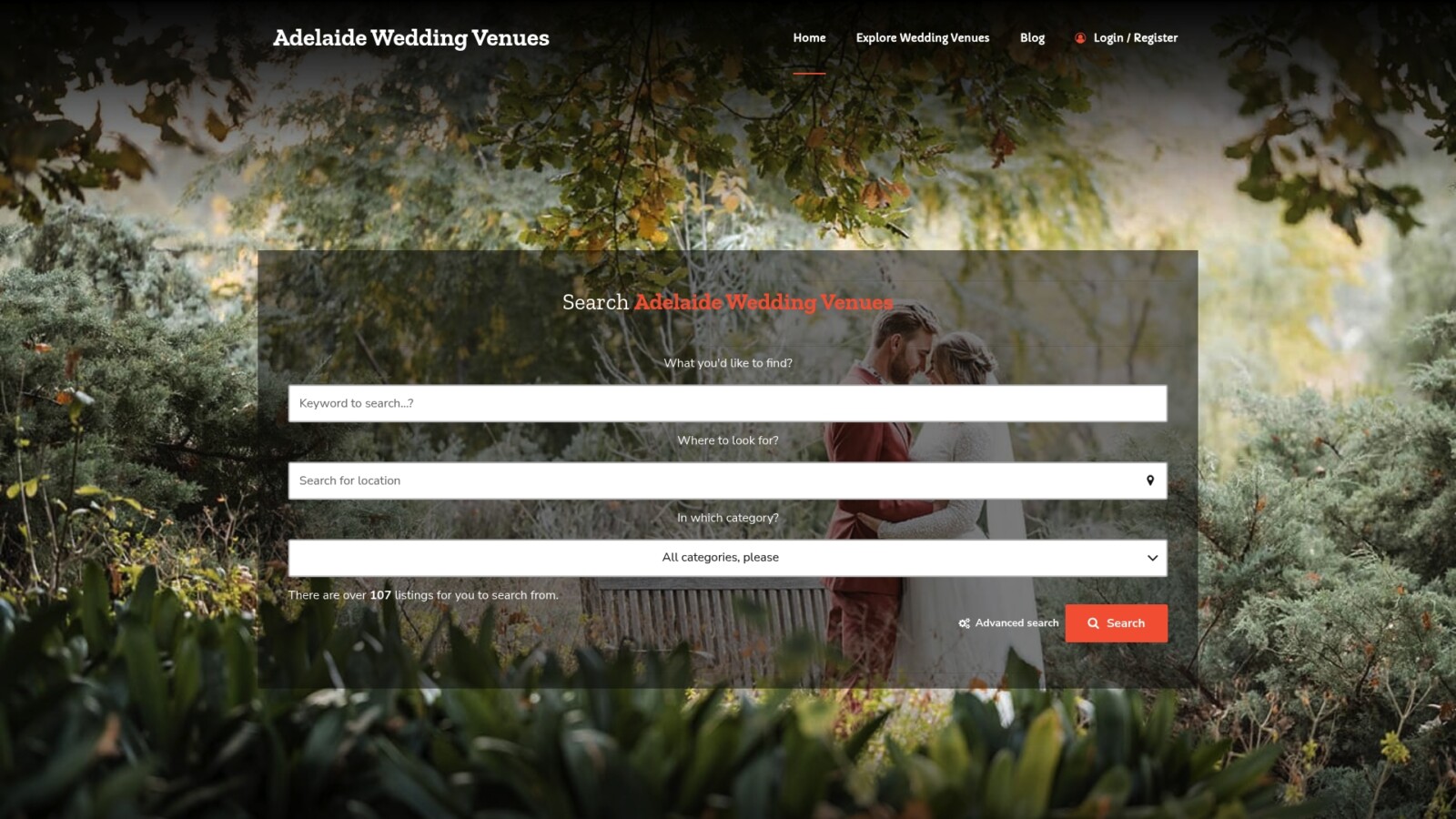
Adelaideweddingvenues is a specialist directory for Adelaide and South Australia wedding venues. Venue owners get a searchable listing with location filters, category tags and capacity details, so couples and planners find them directly without the organiser needing to manage a ticketing workflow at all. Online venue listings reduce search friction for couples and deliver qualified enquiries to venues.
- Lower admin lift: A directory listing captures enquiries passively; no event setup, fee modelling or payout management required.
- Local discovery: Couples searching specifically for Adelaide venues find listings through category and location filters, reaching an audience already in the right market.
To list your venue or explore featured placement options, visit Adelaideweddingvenues and submit your venue details today.
Sources
- Venue management software for hotels: beyond basic event booking
- Ticketing Fees Comparison Report 2026: Which Platform is the Cheapest?
- How to Compare Online Ticketing Platforms (Buyer’s Guide 2026) | HappeNow
- Why seamless integrations matter for event sites
FAQ
What is the best booking software for Australian events?
No single platform is best for every event. EventBookings suits a broad range of AU event types; TryBooking and Humanitix suit community and NFP events; Ticket Tailor suits frequent small events with predictable pricing needs.
How do ticketing platform fees work in Australia?
Most platforms charge a percentage plus a fixed per-ticket amount, with payment processing (typically Stripe-style at around 2.9% + $0.30) added on top. All-in cost modelling across all fee layers is the only reliable way to compare platforms.
What should you test during a booking platform trial?
Run a small live paid event to verify the full payment flow, confirm payout timing in practice, and test that your Stripe-to-Xero or calendar integration works end-to-end before committing to a paid plan.
Which booking platforms comply with Australian privacy rules?
All five platforms operate in Australia and should support data export for attendee records. Confirm that your chosen platform allows full export of attendee and transaction data, as compliance with the Australian Privacy Principles (APPs) is the organiser’s responsibility, not the platform’s.
