
TL;DR:
- Event layout planning involves designing venue elements to optimize guest flow, safety, and engagement. Proper measurement, zoning, and clear pathways are essential for a successful and functional event experience. Digital tools and venue collaboration enhance planning, but physical site visits remain crucial for effective layout validation.
Event layout planning is the process of designing the placement and flow of all elements within a venue to maximise functionality, guest engagement, and safety. Known in the industry as event floor plan design, it is the single most influential factor in whether guests feel comfortable, connected, and well guided throughout your event. Poor layout execution causes chaotic guest movement far more often than poor décor does. This guide gives event planners and coordinators a practical, step-by-step framework for venue layout ideas that work across weddings, corporate functions, conferences, and exhibitions.
What does a solid event layout planning guide cover first?
Every effective layout starts with information, not inspiration. Before you sketch a single zone, you need accurate venue measurements, a clear event goal, and a confirmed guest count. Early planning with clear goals ensures layout decisions support your event objectives and smooth execution. Skipping this stage is the most common reason layouts fail on the day.
Gather the following before touching any floor plan:
- Floor area and ceiling height. Measure the full usable space, not just the room dimensions listed in the venue brochure.
- Utility point locations. Mark power outlets, water access, AV connections, and lighting rigs on your base plan.
- Entry and exit points. Note every door, fire exit, and service entrance.
- Guest count and demographics. A seated dinner for 80 requires a fundamentally different layout than a standing cocktail function for 200.
- Accessibility requirements. Identify wheelchair access routes, hearing loop zones, and rest areas early. The role of event planners includes confirming these details directly with the venue before contracts are signed.
- Regulatory compliance. Check local fire safety codes for maximum occupancy and required aisle widths.
Pro Tip: Request the venue’s technical specifications document, not just a photo of the room. Ceiling height affects rigging, AV projection, and the visual weight of décor installations.
Large events benefit from starting planning 6–12 months ahead, while smaller events need at least 6–8 weeks. That timeline gives you room to revise the layout after supplier confirmations change your space requirements.
How do you design functional zones and plan guest flow?
A functional event layout is built around clearly defined zones and requires accurate venue measurement including floor area and utility points. Zoning means dividing your venue into purposeful areas: registration, dining, lounge, stage, bar, and entertainment. Each zone serves a distinct function and should connect logically to the next.

Guest flow is the path your attendees naturally take through those zones. Designing flow deliberately prevents bottlenecks and keeps energy distributed across the space.
The four most effective layout styles
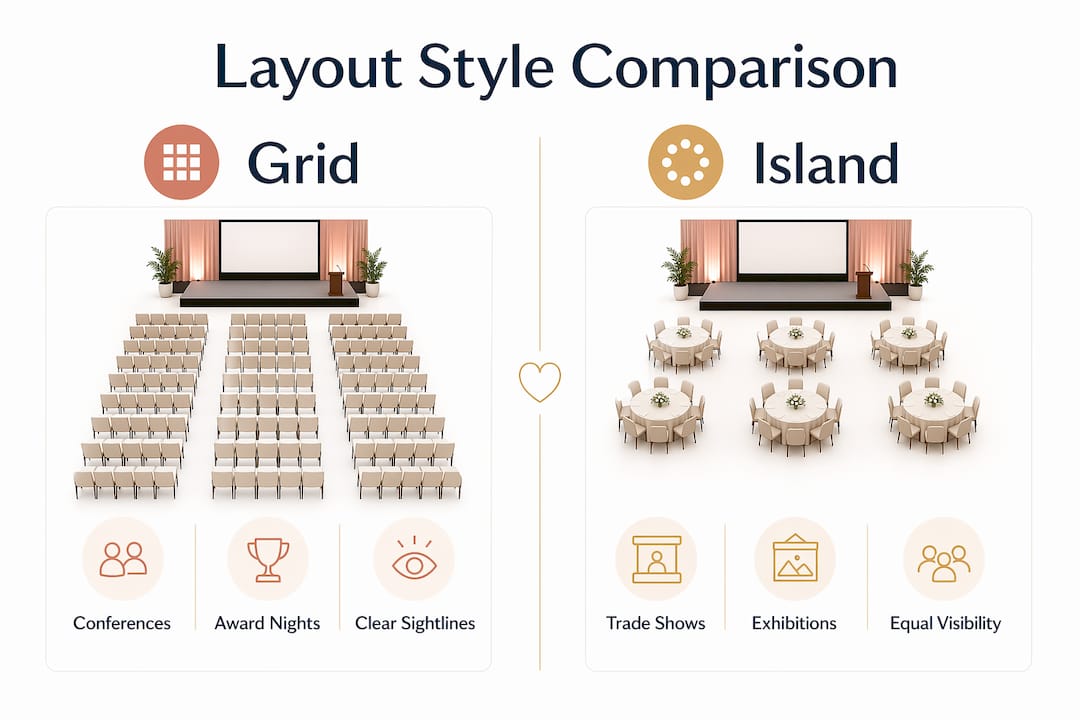
- Grid layout. Rows of tables or chairs face a central focal point such as a stage or screen. Works well for conferences and award nights where attention is directed forward.
- Island layout. Clusters of furniture are placed throughout the room with open circulation space between them. Suits cocktail receptions and networking events where interaction is the goal.
- Hybrid layout. Combines a central focal point with breakout clusters around the perimeter. Ideal for weddings and gala dinners that include both a formal programme and informal mingling.
- Theatre layout. Chairs in rows without tables, maximising capacity for keynote presentations or ceremonies.
Pro Tip: Plan your traffic lanes before placing any furniture. Main pathways need at least 6 feet of width so two people can pass comfortably without disturbing seated guests.
Place high-traffic anchors such as bars and entertainment booths opposite each other or in a triangular arrangement. Triangularly spaced anchor points encourage continuous guest movement and prevent crowd stagnation in one corner of the room.
Layout style comparison
| Layout style | Best suited for | Key benefit |
|---|---|---|
| Grid | Conferences, award nights | Clear sightlines to stage |
| Island | Cocktail receptions, networking | Encourages guest interaction |
| Hybrid | Weddings, gala dinners | Balances formality and mingling |
| Theatre | Keynotes, ceremonies | Maximises seating capacity |
Signage and accessibility routes must be integrated into the zone plan from the start. Clear wayfinding reduces guest confusion and supports inclusive venue design for attendees with mobility or sensory needs.
What digital tools help with event layout planning?
Digital visualisation tools help map traffic flow and allow stakeholder collaboration, making them far more useful than hand-drawn sketches. The right software lets you test multiple configurations before committing to a single setup.
Widely used options include:
- vFairs floor builder. Allows planners to build interactive floor plans, assign zones, and share layouts with clients and suppliers in real time.
- SmartDraw. A general-purpose diagramming tool with event floor plan templates. Suited to planners who need quick, printable layouts without advanced simulation features.
- RoomSketcher. A browser-based tool that produces 3D walkthroughs, useful for presenting layout concepts to venue managers or clients unfamiliar with technical drawings.
- AutoCAD. The industry standard for large-scale or complex venue layouts. Requires training but delivers precise measurements and professional-grade outputs.
Free tools like SmartDraw’s basic tier and RoomSketcher’s free plan cover most needs for small to medium events. Premium tiers add collaboration features, higher export quality, and simulation capabilities that are worth the cost for large-scale productions.
The most underused feature in digital layout tools is traffic flow simulation. Running a simulated walkthrough reveals pinch points at entry zones and around catering stations before a single chair is moved on the day.
What mistakes should you avoid in event layout planning?
Events fail mostly due to poor layout causing chaotic guest movement rather than poor décor. Knowing the most common errors saves you from repeating them.
- Pushing all furniture against the walls. This creates a large, empty centre that feels awkward and discourages interaction. Create intentional zones using partitions or strategic furniture placement, even in smaller venues.
- Ignoring the entry zone. The first impression of your event is set within seconds of arrival. Leave the first 10–15 feet from the venue entry clear and position registration desks at a 45-degree angle to the door. This creates a natural S-curve flow that guides guests into the space without bunching at the entrance.
- Designing for photographs, not movement. A layout that looks symmetrical in a floor plan often creates dead ends or awkward circulation in practice. Walk the layout mentally from the guest’s perspective before finalising it.
- Underestimating contingency space. Suppliers arrive with more equipment than quoted. Catering stations expand. AV rigs need clearance. Build a buffer zone into every layout and include a 10–15% contingency fund in your event budget for last-minute spatial adjustments.
- Neglecting the flow between food and beverage zones. Guests naturally gravitate toward catering. If the bar and food stations are adjacent, you create a single high-density cluster. Separate them by at least one zone to distribute foot traffic.
“Think in movement, not placement. Every furniture decision is a traffic decision.” This principle separates planners who create memorable events from those who simply fill a room.
Pro Tip: Angle your registration desk rather than placing it parallel to the entry wall. A 45-degree position naturally directs guests inward and reduces the perception of a queue.
How do you adapt layouts for different event types?
Layout design for events changes significantly depending on the event format, size, and what you want guests to do. A corporate conference and a wedding reception share the same planning principles but require very different spatial decisions.
Corporate events and conferences prioritise clear sightlines to a stage or screen, easy access to breakout rooms, and defined networking zones separate from the main session space. Branding elements such as pull-up banners and branded furniture should be placed at entry points and along main traffic lanes without narrowing walkways.
Weddings require a balance between ceremony, dining, and dancing zones. The wedding event setup process typically involves a clear transition between ceremony and reception areas, with the dance floor positioned centrally or adjacent to the head table to keep energy focused. Outdoor weddings add weather contingency zones to the plan.
Exhibitions and trade shows use a grid or island layout to give each exhibitor equal visibility. Wide main aisles of at least 3 metres keep foot traffic moving. Corner booths and end-of-aisle positions attract the most traffic, so premium placement matters.
Large-scale events with more than 500 guests need dedicated entry management zones, multiple catering stations distributed across the floor, and clearly marked emergency exit routes integrated into the décor plan. Venue flexibility becomes critical at this scale, as layouts often need to shift between event phases.
Inclusive design applies to every event type. Accessible pathways, quiet zones for sensory breaks, and clearly signed accessible amenities are not optional additions. They are part of a complete layout plan.
For events with a catering component, consulting a specialist resource such as festive meal planning guides helps you allocate the right amount of floor space to food service zones based on menu format and service style.
Key takeaways
A well-executed event layout is built on accurate venue data, deliberate zoning, and designing every furniture decision around guest movement rather than visual symmetry.
| Point | Details |
|---|---|
| Measure before you plan | Collect floor area, ceiling height, and utility locations before sketching any layout. |
| Zone with purpose | Define registration, dining, bar, and entertainment areas with clear circulation paths between them. |
| Keep main lanes wide | Main traffic pathways need at least 6 feet of clearance for comfortable two-way guest movement. |
| Anchor points drive flow | Place bars and entertainment booths in a triangular arrangement to keep guests moving across the space. |
| Build in contingency | Reserve buffer space and a 10–15% budget contingency for last-minute supplier and equipment changes. |
What I have learned from years of watching layouts succeed and fail
The single most consistent mistake I see in event layouts is that planners design for the photograph, not the experience. A perfectly symmetrical floor plan looks great in a presentation but often creates dead ends, awkward furniture clusters, and entry bottlenecks that no amount of styling fixes on the day.
The planners who get it right share one habit: they walk the layout before it is set. Not on paper, not in a digital tool, but physically in the empty venue. They stand at the entry and ask where their eye goes. They walk to the bar and notice whether the path feels natural or forced. They sit at a guest table and check whether the stage is visible without craning their neck.
Digital tools like vFairs and SmartDraw are genuinely useful for sharing plans with clients and suppliers. But they are a communication tool, not a substitute for spatial intuition. The simulation features are worth using, yet nothing replaces standing in the room.
My strongest advice is to start the layout conversation with the venue manager, not after the contract is signed. Venue managers know where the acoustics are poor, where the natural light creates glare at 4 pm, and which corners guests instinctively avoid. That knowledge is free and it will save you a revision cycle.
Finally, build flexibility into every layout. Events change on the day. A supplier runs late, a guest count shifts, a keynote speaker needs more stage depth. The planners who handle those moments calmly are the ones who left buffer space in their original plan.
— Steven
Planning your next Adelaide event with the right venue
Finding a venue that supports your layout vision is as important as the layout itself. The right space gives you the flexibility to zone effectively, accommodate your guest count, and adapt on the day.
Adelaideweddingvenues is South Australia’s specialist directory for wedding and event venues, with detailed listings that include capacity information, floor plan availability, and accessibility features. Whether you are planning an intimate gathering or a large-scale celebration, browsing the ideal wedding venue guide gives you a practical starting point for matching venue features to your layout requirements. Planners working across Adelaide can also explore unique Adelaide venue options to find spaces that suit a range of event formats and guest numbers.
FAQ
What is event layout planning?
Event layout planning is the process of designing the placement of all physical elements within a venue to support guest flow, safety, and engagement. It covers zoning, traffic lane design, furniture placement, and accessibility compliance.
How wide should walkways be at an event?
Main traffic pathways should be at least 6 feet wide to allow two guests to pass comfortably without disturbing seated attendees. Service lanes used by catering staff typically require additional clearance.
When should I start planning my event layout?
Large events benefit from beginning layout planning 6–12 months in advance, while smaller events need a minimum of 6–8 weeks. Starting early allows time to revise the layout after supplier confirmations.
What is the biggest mistake in event layout design?
Pushing all furniture against the walls is one of the most common errors. It creates an empty, disengaging centre and discourages guest interaction. Creating intentional zones with partitions or clustered furniture produces a far better experience.
What digital tools are best for creating event floor plans?
vFairs floor builder, SmartDraw, and RoomSketcher are widely used options across different budget levels. For large or complex venues, AutoCAD delivers the most precise measurements and professional outputs.
